ARGUS EDITOR / YOUR AI EDITING TOOLKIT
Turn your recordings
into finished reels.
Let AI do the editing.
Argus Editor is a downloadable toolkit for Claude Code. Tell it what you want: it cuts mistakes, adds captions and creates graphics. You review the edit and ask for changes.
What you need before you start
Claude Pro · $20/month USD or a higher Claude plan, used through Claude Code.
Mac or Windows · 16 GB RAM · 10 GB free space · internet.
Claude is billed monthly in USD; local prices and taxes vary. Usage limits apply. Full requirements ↓$27 USD once for the toolkit · Claude subscription extra

Built by Alex ScottThe creator behind @alexfscott
FROM @ALEXFSCOTTSee all top reels ↓
Jetour T2 vs Toyota Prado
Watch on InstagramThe car war: Japan vs China
Watch on InstagramA personal stylist inside ChatGPT
Watch on InstagramThe car war: Jetour takes on the UAE
Watch on InstagramWhere did 236,000 Chinese cars go?
Watch on InstagramInstagram views checked 15 November 2026. Published examples from Alex’s feed.
Remove pauses & mistakes Captions & hooks 11 reel styles Export your video
HOW THE AI EDITING PROCESS WORKS
You record.
AI handles the editing.
Film on your phone, move the clip to your computer and give your instructions. The toolkit guides the AI through the cut, captions and graphics. You review the result.
FROM RECORDING TO FINISHED REEL
STEP 01 / 05
Record on your phone
Record your idea in your own words. Leave the pauses and second takes in — you can remove them in the edit.
Start with your own recording.
Animated walkthrough of the workflow. You approve the cut and creative choices before the final export.
“Editing a reel used to take me two days. With AI, it takes me about two hours.”Alex Scott · My own editing experience
Time varies with footage, graphics, revisions, computer performance and AI usage limits.
WHAT IT HELPS YOU DO
Tell Claude what to edit.
It does the work.
EXAMPLE INSTRUCTION
“Cut the pauses and restarts. Keep my last complete take, and leave the natural breaths.”
Claude uses the toolkit to remove pauses and repeated takes, keeping your last complete take. You check the cut before adding captions or graphics.
Review the cut before moving on to captions and visuals.
MORE FROM @ALEXFSCOTT
More reels.
Over 10,000 views each.
Explore the rest of the top reels below. Every cover opens the original Instagram video.
They don’t sell cars here
Watch on InstagramWhy is the Gulf betting on these?
Watch on InstagramCheap AI won’t last
Watch on InstagramFreelander: British name, built in China
Watch on InstagramDubai is hiring AI agents
Watch on InstagramWho owns your lunch?
Watch on InstagramJetour G700: the weekend test drive
Watch on InstagramInstagram view counts checked 15 November 2026. Rounded where shown by Instagram; the G700 count was checked in Insights. These are Alex’s published videos, not guaranteed results from this toolkit. Playing a reel loads Instagram.
11 INCLUDED STYLES
Choose a style.
Skip starting from scratch.
Choose from 11 included reel styles, then change the fonts, colours, captions and graphics to suit your video.
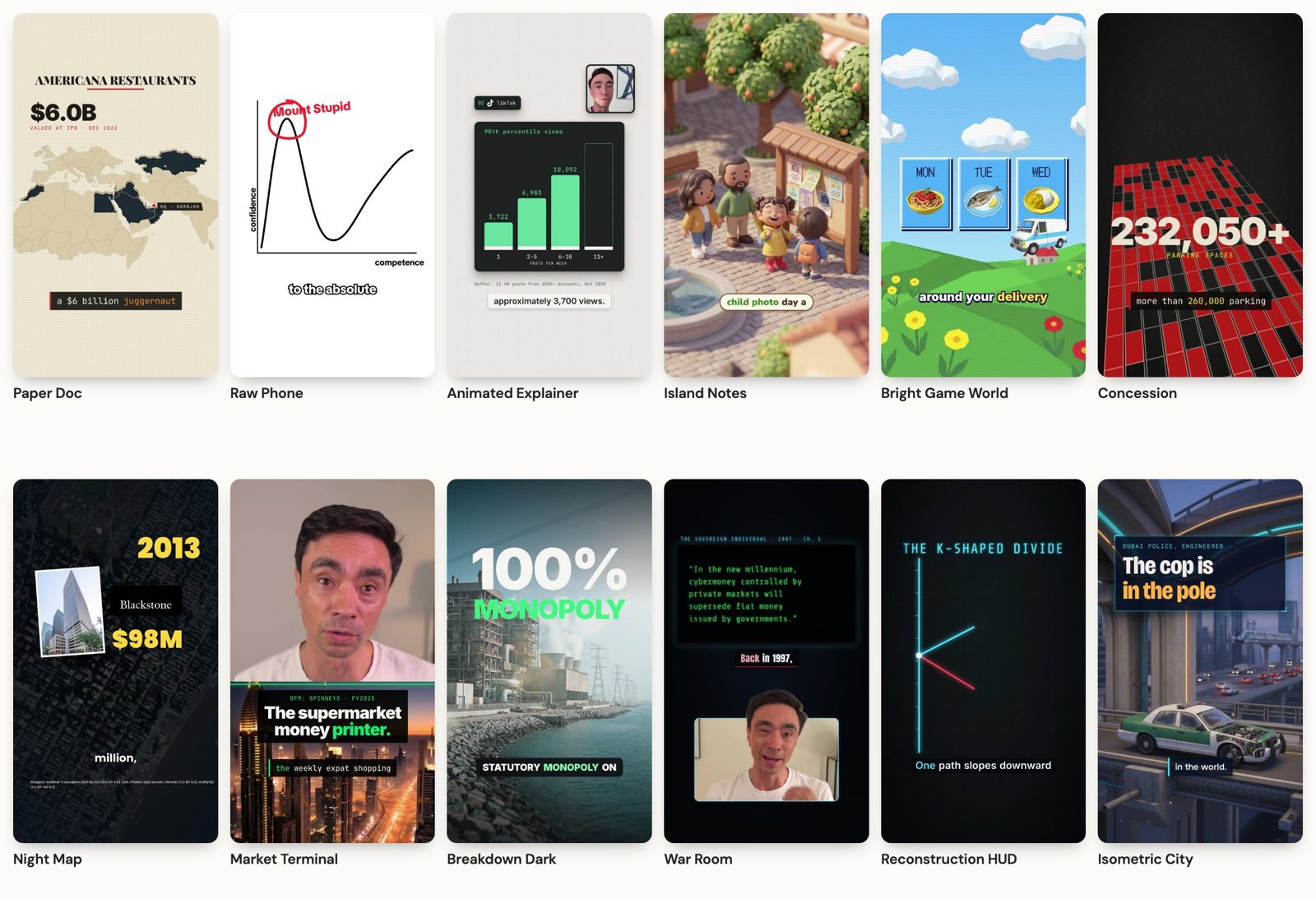
Visual references from Alex’s work. The exact result depends on your footage, chosen workflow and creative direction.
“Keep it simple.
Use captions only.”
“Make it feel editorial.
Put the key facts on screen.”
“Use an explainer style.
Add a diagram for this point.”
INSIDE YOUR DOWNLOAD
Here’s what
the $27 gets you.
Argus Editor ZIP downloadEditing tools, styles and setup instructions.
The editing toolkit
The downloadable Argus Editor folder: workflows and tools for rough cuts, captions, hooks, graphics, sound and finishing.
Guided Mac & Windows setup
Open the folder in Claude Code and type “set me up”. The setup workflow checks your computer and walks through the required tools.
Creative planning & review
A beat sheet, visual planning and still-frame approval, so you can shape the edit before the full render.
11 designed reel styles
Starting points for your visual direction, with instructions for adapting the look to your own content.
Covers & export workflows
Cover options from your footage, plus paths to a finished MP4, an editable CapCut draft or a Resolve handoff.
The editing playbook
Written guidance for cuts, sound, hooks, graphics and final checks. A repeatable process you can use on your next recording too.
Download after checkout.
Your personal link also arrives by email.
IS THIS FOR YOU?
Record regularly?
Make editing easier.
Use it to edit short videos for your content, business or teaching. It is for people who already record videos and want help with the time-consuming editing work.
You’ll get the most from it if…
You have your own footage and a story to tell.
You want to give editing notes in plain English.
You’re happy to review the cut and refine the details.
You can install tools and work on a Mac or Windows PC.
Before you buy
This is a computer-based toolkit for Claude Code. It needs setup and creative review. Claude Pro ($20/month USD) or a higher Claude plan is required and paid separately. You also need at least 16 GB RAM and 10 GB free space.
HI, I’M ALEX
That’s me
in the reels.
I make videos about technology, business and everyday ideas. The clips on this page come from my own feed.
Argus Editor gives Claude the instructions and tools to cut your recordings, add captions and graphics, and prepare the finished video. You choose what to keep and what to change.
Explore @alexfscott Alex Scott Creator of ArgusGET THE EDITING TOOLKIT
Get Argus Editor.
Pay $27 once.
Includes the editing toolkit and setup instructions. Download it, open it in Claude Code and start editing your own recordings.
- Editing workflows & supporting tools
- Guided Mac and Windows setup
- Creative plan, beat sheet & review steps
- 11 designed reel styles
- Covers, captions & finishing workflows
- Protected ZIP download + emailed access link
ARGUS EDITOR
$27 USD
One-time purchase
No Argus subscription
Applicable tax is shown at checkout.
Claude subscription and optional tools are extra.
Check your setupMac or Windows · 16 GB RAM · About 10 GB free · Claude Code with Claude Pro ($20/month USD) or a higher Claude plan
One-person license. Read the terms · Ask a question
TRY IT FOR YOURSELF
30-day money-back guarantee.
Try Argus Editor for 30 days. If it isn’t right for you, we’ll refund your purchase in full.
Email support@withargus.ai within 30 days of purchase with your order email or receipt.
Covers your Argus Editor purchase. Third-party subscriptions and charges are separate. Guarantee detailsQUESTIONS BEFORE BUYING
What you need
to know.
Setup, subscriptions, exports and delivery.
Plan prices checked 15 November 2026. Claude pricing · ChatGPT Plus pricing
What is the 30-day money-back guarantee?+
Try Argus Editor for 30 days from your purchase date. If it is not right for you, email support@withargus.ai within those 30 days with your order email or receipt and we will refund your Argus Editor purchase in full. The guarantee covers the toolkit purchase; third-party subscriptions and charges are separate.
What exactly am I buying?+
A downloadable editing toolkit that runs with Claude Code on your computer. It contains the workflows, tools, style options and written setup guidance described above. You bring your footage, your Claude plan and the creative direction.
How is this different from asking Claude to edit a video?+
Argus supplies a structured editing process and supporting tools: rough cut, creative plan, visual review and finishing. Instead of inventing a new process for every recording, you start from the included workflow and give notes as you go.
Do I need to know how to code?+
You give instructions in plain English. Claude Code runs the technical steps, but you should be comfortable installing software, working with folders and following setup prompts. The first setup can require administrator permission on your computer.
What computer and subscriptions do I need?+
A Mac or Windows PC with at least 16 GB RAM and about 10 GB free space, an internet connection and Claude Code with Claude Pro ($20/month USD) or a higher Claude plan. Apple Silicon is recommended on Mac. Claude and any optional software or usage charges are separate from the $27 purchase.
Does this work with ChatGPT or Codex?+
The included setup is written for Claude Code. ChatGPT/Codex compatibility has not been verified for v1.0.1, so do not buy it expecting that workflow yet. OpenAI’s $20/month plan is called ChatGPT Plus, not Pro.
Can I edit on my phone or in ordinary Claude chat?+
This release is designed for Claude Code on a computer. You can film on your phone, then transfer the recording to your computer. A phone-only editing workflow and ordinary browser-chat setup are not included.
What kind of video should I start with?+
Start with a short, clearly recorded talking-head video. The setup guide also covers voiceover over your own B-roll and animation-led reels. The clearer the source audio and your direction, the easier the edit is to review.
Is every video finished in one prompt?+
Expect a process: rough cut, creative direction, review and revisions. Render time depends on your computer, footage and visual complexity. Check the final cut, captions, factual graphics, sound and media rights before you publish.
Do I need CapCut or DaVinci Resolve?+
Choose the finished MP4 workflow if you want a rendered file. If you want an editable CapCut draft or a Resolve handoff, you will need the relevant editor installed and configured. The setup guidance explains the tools for your chosen workflow.
What happens after I pay?+
Stripe returns you to a protected download page, and a personal download link is sent to your purchase email. Download the ZIP, unzip it into a local folder and open that folder in Claude Code.
Is this a subscription or the Reels Machine course?+
Argus Editor is a separate $27 USD one-time purchase for the editing toolkit. There is no Argus subscription for this purchase. Optional video training is planned separately. You do not need the course to use Editor. Existing $99 Reels Machine + course reservations remain valid; buyer upgrade terms will be explained before training opens.
Can I share the toolkit with my team?+
The download has a one-person license. Do not share, redistribute or resell the toolkit. Read the license before purchasing, or contact Argus if you need help deciding whether it fits your use.
EDIT WITH PLAIN ENGLISH INSTRUCTIONS
Less manual editing.
More time to make videos.
Get Argus Editor · $27$27 USD · One-time · Download after payment
OPTIONAL, WHEN YOU WANT MORE GUIDANCE
Want to learn alongside Alex?
The toolkit works without a course. Video training is in development for people who want a guided walkthrough. Existing $99 package reservations remain valid.
See the training plans →